Sunday, May 3, 2020

FMX SP 2020 Portfolio


FMX SPRING 2020
Portfolio

It is crazy to just think like that the semester has come to an end. I can still remember the sense of fear that I had coming into this class for the first time and by just looking at my work I have done all semester, I think that I transformed that fear into a drive to work harder and learn these systems even more. My portfolio as you keep on going through the pages starts with very basic work all the way to the work I thought got more difficult along the course. I think out of all the projects I have done in this class, I believe that the Somewhere project was by far my favorite one as it was one of the proudest pieces of work I think I made. 

This semester has challenged me in this class to be more creative and to think outside of the box and not to be scared to express true meaning in art. I enjoyed it very much as I finally learned how to use photoshop and that was one of my goals from the start of the semester. I would like to thank all my peers for their support and their comments on my work and a huge thank you to Professor Roundtree who has helped me become the artist I was transformed into through this whole semester. 


Friday, April 24, 2020

Business Card


The.Social_Seeker Brand Awareness Business Card


The Social Seeker is a social media page on Instagram where they highlight people from all over the world seeking adventure in their lives. The main goal of this brand is to bring together world wide societies through life's adventures and to ultimately seek the adventures life brings to us. Now I say adventure I don't just mean your typical hike or traveling thousands of miles on an airplane. When I say adventure I also mean all the life experiences that we have in life from making someones day to even figuring out how to do a puzzle. With these experiences comes different stories and memories that will for sure have helped you seek life. 

This project took me about 2 hours to do as I had to fix and play around with many colors, fonts, and shapes. The Social Seeker is a personal brand I created due to the fact that I love finding stories on people that many people might have somewhat of a discomfort doing. I enjoyed making this as it was intentionally first made for my personal brand but later then transitioned it to my class assignment. 


Tuesday, April 21, 2020

Autoscopy


"Scooby in Paradise"

So this project was one that I got the pleasure to better understand as I didn't do it right the first time but its ok as I believe it led me to a more creative way of seeing the project. I enjoyed this project as it gave me a lot of freedom on how I can design basically myself! I decided to name it Scooby in Paradise since Scooby Doo is one of those characters in the cartoon show to always be a goofball, and always seem too look like he is tripping out. That may be just personal opinion but it just felt perfect to put the character into this scenario. 

This project the second time around took me about 2 hours to make as there were a lot of masking issues I was having. Although it wasn't  a long project I believe that this project has taught me many things. For the first part is how to be more creative with my work and also many more features on photoshop! It was 1,000% a pain to do it again but I'm glad I was able to come up with this piece.

Wednesday, April 15, 2020

My Logo


My Personal Logo
"Javier Rodriguez"

This was a project that really had made me think and think again about because of various rejects from my professor... which was a good thing! I believe if it wasn't for her I would not have been able to come up with my complex design for my logo which has a lot of meaning into a story of my life. This project shows my life in which I used my initials to represent different things. The arrows on the end of each letter means how life is crazy but that says its a call for adventure! This represents more of my go with the flow mentality. Now the line going up and down the the horizontal part of the letter J means life and music which play a big role at least in my life as music has always been there for me through my highs and lows. My mood would change and so would my music so that's why the lines represent life ups and downs but also it represents a music track. 

This project took me about 3 days to complete as I couldn't decide what I wanted to do and also the fact that I had to change my design and incorporate things from designs I didn't use about 8 times. But this project not only gave me a grade but gave me some inner confidence as of who I am as a human. I am very happy with this work because I put a lot of thought and time into it and I am happy it truly can represent my life. 

Monday, April 13, 2020

Somewhere - "Hero Unknown"


"Hero Unknown"


Hero Unknown, is a presentation in showing that not all heroes wear capes and we can be as big as a hero like supper man by just being the person we are in our everyday lives. The power of being nice to someone is something that I see that can save many. You never know what someone may be going through and with that you don't know if that smile you gave to someone or that hand shake you gave them can change how their day has been. As humans we have the supper power to make things better and that's what we should all do no matter in whatever situation we are in. You never know if by making someones day with such a simple action can even lead you to having an even better day!

This project was another favorite of mine because of the meaning I wanted to share with the work of art I did. I believe in the importance of everyone having at least someone in their lives. In all honesty I believe that a friend, family member, or even a pet can be a hero making your day better day by day. This project took me around 2 hours to make and as I kept on working on it I felt more proud of myself because its a moral that I myself practice and getting to share it with an audience is even better!


Wednesday, April 8, 2020

Somewhere Inspiration

  1. This first image was the one that I see the hardest to put myself In because there is a lot of detail I have to fix and mass and a lot of layering and color correcting as well.
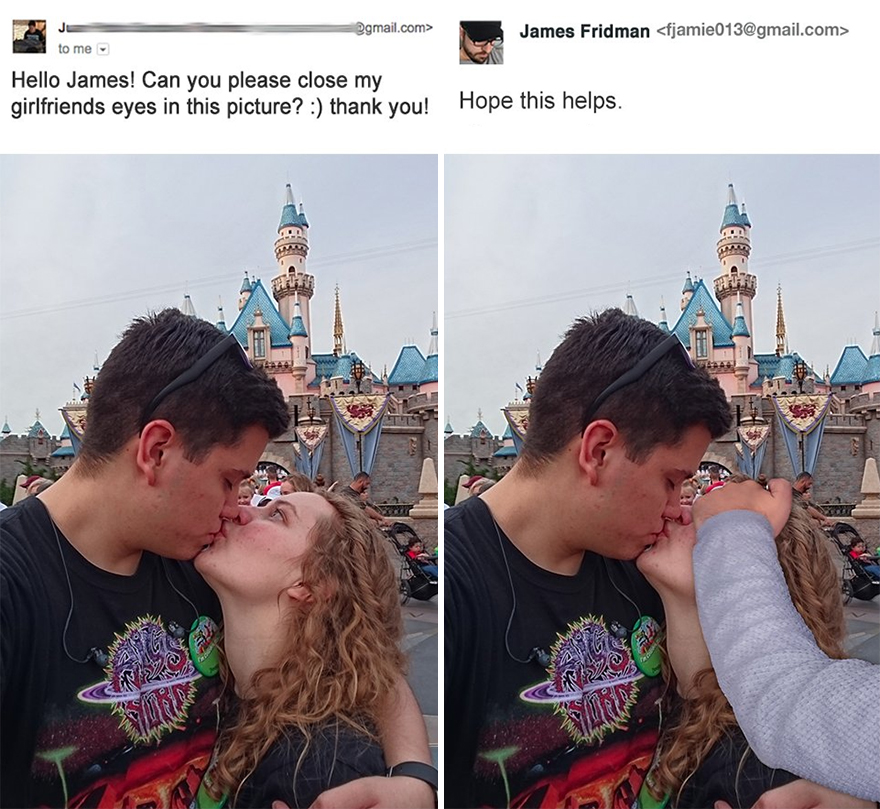
2. This is an image that has inspired me for my project because it is somewhat what I want to do but in a different scenario. 
Funny-photoshop-troll-james-fridman

3. This one made me laugh the most because he takes such a spin to a play in words to his actual photoshop action! I think its genius!

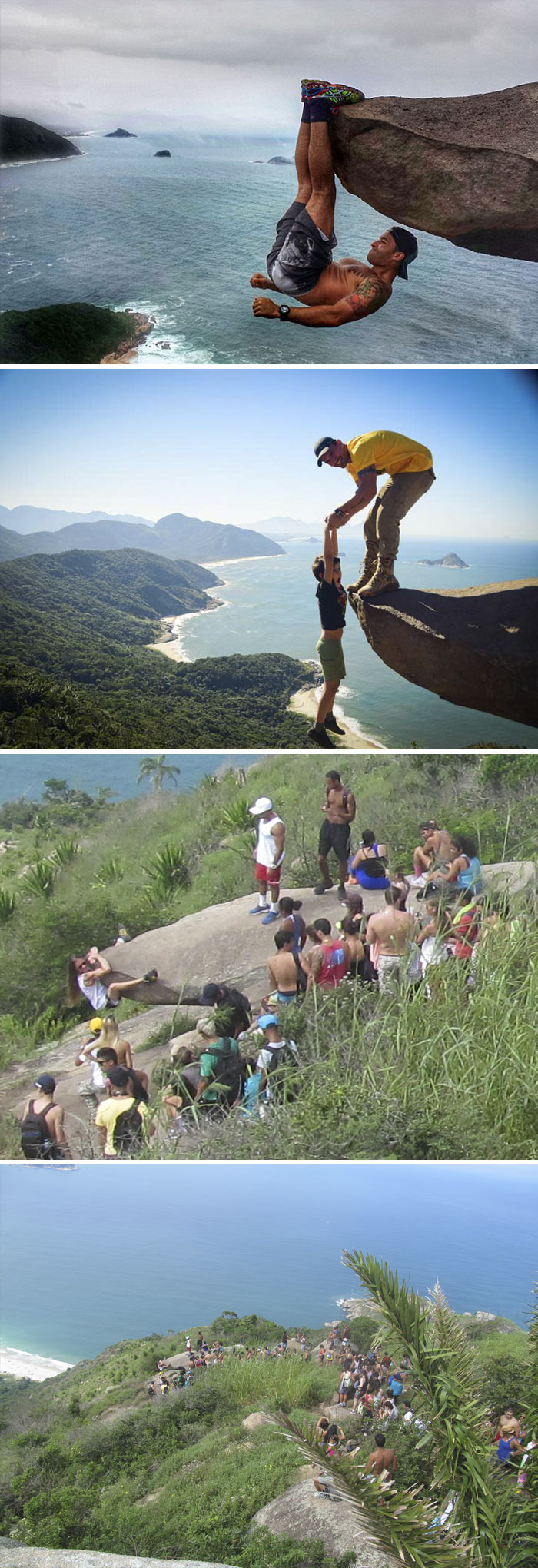
Reality Behind Photography
4. I would like to recreate something like this into play because I think I can do somethings that many won't even think of. 


Wednesday, April 1, 2020

Layers Project


Scooby DO Where R YOU?

This has been one of the projects that just had me laughing because it is funny how the original photo is in a social greek event on campus filled with people in the background. Now the I am in a Scooby Do Costume in my neighborhood which had me cracking up because it showed me how my character and persona is the same where ever I go. That was one fact that I realized during this project that made it so enjoyable because it gave me some closure on my person and for That Reason I called my project Scooby DO Where R You?. 

This took me about one hour to gather all my files and actually edit the pictures. It wasn't a project that took one and helped me master what layering is as it gave me the proper technique to start on something more challenging. My favorite part of doing this is learning how to use the mask selections and seeing it all come together. 

Tuesday, March 31, 2020

BW to Color


Original


Celebratory

Celebratory, is the distingtsion between different moods a certain picture can have. Using colors as moods. Anyone can put their own story on what is happening in this picture. But separating the different areas of interest is the biggest separating factor of this whole project. Each section depending on the color have a significance and a scenario that can happen by just the color of the objects. This piece is a point of view piece in which can be seen differently by which ever eye is viewing it.

This project was a fun one as I got to learn some tools why play around with a picture I took of my best friend and I asking for a drinking package refund that we finessed our way of getting while on vacation! It took me about 2 hours to complete it. It is very interesting to see what color can do to just simply a black and white colored image and bring its own story to the table.


Friday, March 27, 2020

Tag Brush Project


Original Logo


Tag Brush Final Project


This project is defiantly one that I will never forget as I had a lot of difficulty understanding how photoshop first worked. But got through with help from the best professor ever on zoom! Professor Roundtree was able to teach me what I did not understand for me able to finish the project. A huge thank you to her for all the help! This project took me a span of 3 days putting at least 2-5 hours a day on it. 

The reason why I choose these colors is because the logo Tag Brush is suppose to represent me. I chose to put a blue tag in the bottom left because it represents me and only me as there is no other person like me. I added the brush several times in the background in a darker color because it represents all I have had to go through in my life. The four gold tags each represent in order Family, Friendship, Love, and Care. It represents my top four characteristics that I treasure the most. Finally the one bold red tag in the front represents my mark on this world. It is in red as it represents awareness. 

This was a great project and I will never... I promise never forget as it gave me many issues but came out with a project that I will treasure with the time and meaning put into it. 


Wednesday, March 18, 2020

Self Portrait


Semester Two?


Inspiration

This project was one that I truly enjoyed making just because of the fact that I was able to take a picture taken of me and use it as a propaganda for what's going on in the world with the Corona Virus. This virus is one that shouldn't be taken lightly but I used my cartoon self portrait and this epidemic to show how students all over the world are feeling as their semester comes to an end. I named it "Semester Two?" because this was not an expected turn out on how we had to end the school year. 

This project took me about 4 hours to make as there were many different shapes and shading that I had to put together in order for the cartoon visual and my self come to life in the cartoon world. I loved that I was able to use myself the most as it helped me make it as best as possible in order to show the person I am today.

Tuesday, March 3, 2020

Gradient Mesh Project

Meshed Green Apple

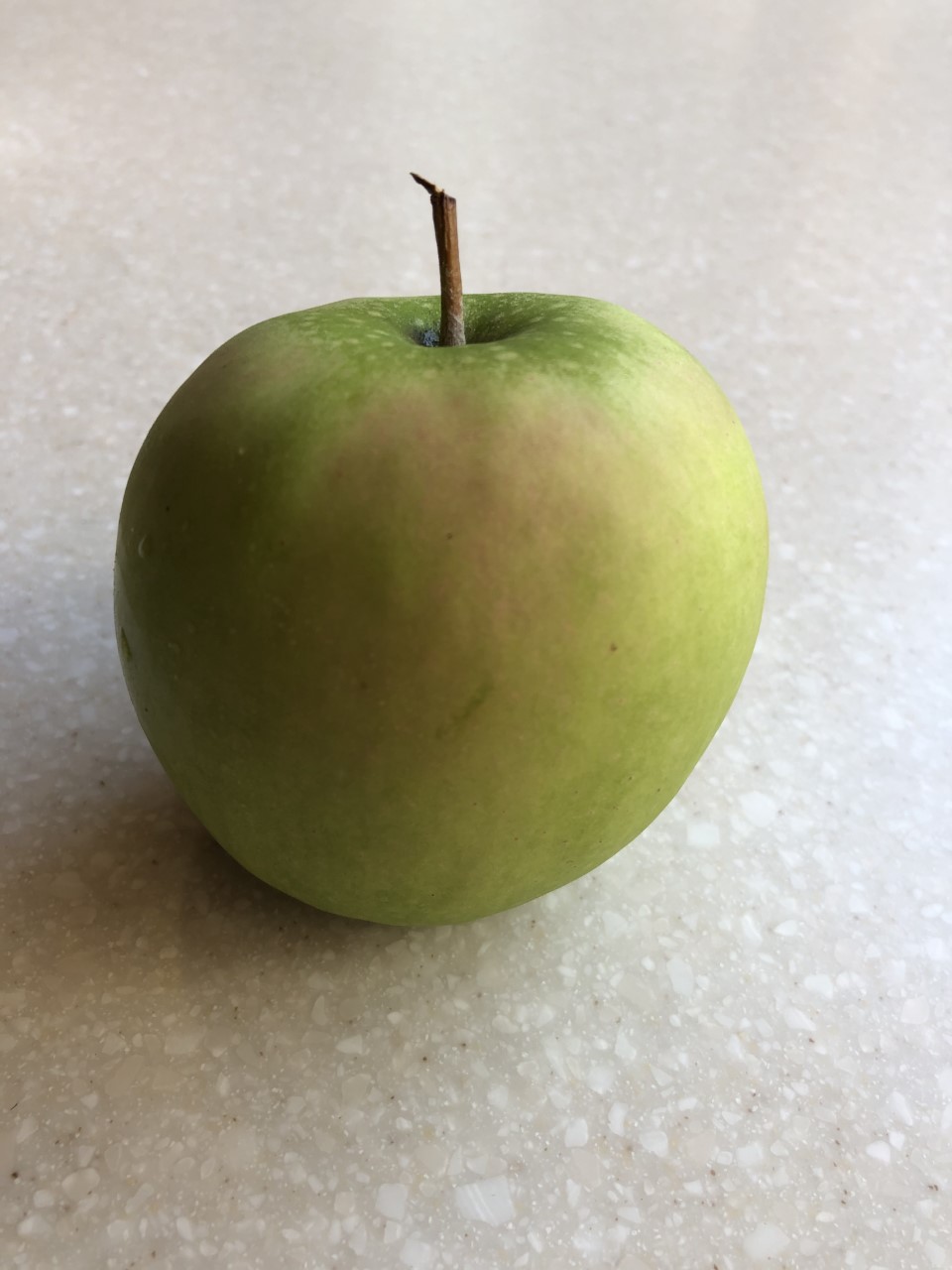
Green Apple Inspiration

I decided to use an apple as my inspiration for my Mesh Project. This really doesn't have any meaning on why I choose to do an apple but the only meaning it does hold is me trying to find anything to work with while I am on my busy schedule. This whole project in its entirety was very fun as it gave me the chance to relax but have a great time doing it as well. I was searching peoples rooms to see what item I can use and of course nothing came to my mind but that one time I went to the Dinning Hall and saw the apple shown above on the floor lonely and looking for a brand new owner. 

This project in its entirety took me around 5 hours to figure out what I was doing and also making it. I used different techniques in order to make this. I first used the pen tool to outline my original picture then I used the mesh tool in order to get the shadows placed as well as using the dropper tool right after. For the most part creating this apple was easy but I had some complications trying to get the shadow as best as possible as well as the stem of the apple. Overall it was a great lesson and I see myself doing this again in the near future for my personal needs.


Monday, February 24, 2020

Caligram Apollinaire Project


TITLE: COCO LOCO OCEAN WIDE


Inspired by yearly summer cruise traveling, this piece purpose is to show all the places I have been since starting to work full time in the summers as a on board DJ and Cruise Director. On every palm tree branch is a ship I have worked or been on. The trees bark plus all the sand have the names of all the Caribbean Islands I have been able to explore and travel as my ship goes port to port. On the bottom of the sand there is a blue sign that says "DJ COCO LOCO" which is my DJ name and under it says "EST 2018" because that was the year I started to work on the cruise ships. 

This project was very fun to do as it gave me the opportunity to look back and remember all the great experiences I had on the ship and at all of the ports as well. The reason why I chose a palm tree to represent this is because the palm tree is what brings everything together for the Caribbean. The palm tree in my opinion has big value and that is why a palm tree is incorporated into my logo as a DJ. This was a great project I worked on and was happy to spend the time that I spent to do it.  


Tuesday, February 11, 2020

Canvas Final: BB8

Mine:


Inspiration:


  • Possibly one of the best and most fun project I have done using HTML Code!


  • This was done over a course of 3 class Periods.


  • 448 Lines of Code


BB8 is one of those characters that everyone at least knows by what the tiny little robot looks like. Even though BB8 is tiny he still brings big things to the table. I wanted to make this to illustrate what power and extravagance this little guy has as he is on Star Wars. In order to do that I first created his figure with a bold outline and inserted all the curves bolts and screws and his eye on. I made it look as realistic as I could have made it using code.

As I completed the figure, I started to see what I would be able to do in order to showcase the grand character he is for all Star Wars lovers. I inserted a silver circle gradient in back of him to make him pop out with the outer later outside of the circle in all black. This left BB8 looking like he is ready to take over the world giving him a super hero look. I decided to outline the circle with orange lines going around him in order to represent how grand and extravagant he is. This was a project that I loved to work on because it brought my childhood one step closer to come alive.


My Code:

<!doctype html>
<html>
<head>
<meta charset="UTF-8">
<title> FMX 210 DIGITAL MEDIA - CANVAS PROJECT </title>

<style type="text/css">

body,td,th {
font-family: Helvetica, Arial, sans-serif;
font-size: 12px;
color: rgba(255,255,255,1);
}

body {
background-color: rgba(0,0,0,1);
}

#myCanvas { border: rgba(102,0,255,1) medium dashed; background-color: rgba(255,255,255,1); }

</style>

</head>
<body>
<canvas id="myCanvas" width="800" height="600"></canvas>
<script>

var canvas = document.getElementById('myCanvas');
var context = canvas.getContext('2d');


//// >>>>>>>>>>>>>>>>>>>>>>>>>>>>>>> YOUR CODE STARTS HERE


//Background

 var x = 0;
var y = 0;
var width = canvas.width;
var height = canvas.height;

var centerX = 400;
var centerY = 300;
var radius = 200;


// Gradient

context.beginPath();
context.rect(x, y, width, height);
context.lineWidth = 20;
context.fillStyle = 'rgb(200, 200, 200)';
context.fill();
context.stroke();

var x = 0;
var y = 0;
var width = canvas.width;
var height = canvas.height;

var centerX = 400;
var centerY = 300;
var radius = 200;

var startX = 300;
var startY = 200;
var startRadius = 50;
var endX = 400;
var endY = 300;
var endRadius = 200;


context.beginPath();
context.rect(x, y, width, height);
context.lineWidth = 20;
context.fillStyle = 'rgb(0, 0, 0)';
context.fill();
context.strokeStyle = 'rgb(0, 0, 0)';
context.stroke();

context.beginPath();
context.arc(centerX, centerY, radius, 0, 2*Math.PI, false);
var grd = context.createRadialGradient(startX, startY, startRadius, endX, endY, endRadius);
grd.addColorStop(0, 'rgb(128, 120, 127)');
grd.addColorStop(1, 'rgb(200, 224, 215)');
context.fillStyle = grd;
context.fill();
context.stroke();

//// big circle

  var centerX = canvas.width / 2.0;
        var centerY = canvas.height / 2.0;
        var radius = 100;
        var startangle = 0;
        var endangle = 90 * Math.PI;

        context.beginPath();
        context.arc(centerX, centerY, radius, startangle, endangle, false);
 
        context.lineWidth = 10;
        context.strokeStyle = "black";
        context.stroke();

 //top arc

var centerX = 400;
        var centerY = 215
        var radius = 80;
        var startangle = 3.0* Math.PI;;
        var endangle =  2.0* Math.PI;

        context.beginPath();
        context.arc(centerX, centerY, radius, startangle, endangle, false);
        context.fillStyle = "clear";
context.fill();
      context.lineWidth = 10;

        context.strokeStyle = "black";
        context.stroke();


//Simple lines

context.moveTo(317,215); // COORDINATES OF STARTING POINT
context.lineTo(483,215); // COORDS OF ENDING POINT 1
context.lineWidth = 5; // STROKE WIDTH
context.stroke(); // STROKE


 //// small circle

  var centerX = canvas.width / 2.0;
        var centerY = canvas.height / 3.3;
        var radius = 20;
        var startangle = 0;
        var endangle = 90 * Math.PI;

        context.beginPath();
        context.arc(centerX, centerY, radius, startangle, endangle, false);
 
        context.lineWidth = 15;
        context.strokeStyle = "black";
        context.stroke();

 //// small circle 2 int.

  var centerX = canvas.width / 2.0;
        var centerY = canvas.height / 3.3;
        var radius = 10;
        var startangle = 0;
        var endangle = 90 * Math.PI;

        context.beginPath();
        context.arc(centerX, centerY, radius, startangle, endangle, false);
 
        context.lineWidth = 20;
        context.strokeStyle = "navy";
        context.stroke();

//// smaller circle 3 ext.

  var centerX = canvas.width / 1.8;
        var centerY = canvas.height / 3.2;
        var radius = 3;
        var startangle = 0;
        var endangle = 90 * Math.PI;

        context.beginPath();
        context.arc(centerX, centerY, radius, startangle, endangle, false);
 
        context.lineWidth = 7;
        context.strokeStyle = "black";
        context.stroke();

// Black TRIANGLE

context.beginPath(); // begin a shape

context.moveTo(345,250); // point A coordinates

context.lineTo(475, 275); // point B coords

context.lineTo(400,360); // point C coords

context.closePath(); // close the shape

context.lineWidth = 5
; // you can use a variable that changes wherever you see a number

context.lineJoin = "round";

context.strokeStyle = "rgb(0,0,0)"; // Reb Green Blue Alpha

context.stroke();


//bottom arc 1

var centerX = 300;
        var centerY = 255
        var radius = 70;
        var startangle = 3.8* Math.PI;;
        var endangle =  2.5* Math.PI;

        context.beginPath();
        context.arc(centerX, centerY, radius, startangle, endangle, false);
        context.fillStyle = "clear";
context.fill();
      context.lineWidth = 15;

        context.strokeStyle = "orange";
        context.stroke();

//bottom arc 2

var centerX = 400;
        var centerY = 400
        var radius = 70;
        var startangle = 5.1* Math.PI;;
        var endangle =  3.9* Math.PI;

        context.beginPath();
        context.arc(centerX, centerY, radius, startangle, endangle, false);
        context.fillStyle = "clear";
context.fill();
      context.lineWidth = 15;

        context.strokeStyle = "orange";
        context.stroke();


//bottom arc 3

var centerX = 510;
        var centerY = 290
        var radius = 55;
        var startangle = 4.6* Math.PI;;
        var endangle =  3.3* Math.PI;

        context.beginPath();
        context.arc(centerX, centerY, radius, startangle, endangle, false);
        context.fillStyle = "clear";
context.fill();
      context.lineWidth = 15;

        context.strokeStyle = "orange";
        context.stroke();


//// smaller circle 4 ext. bottom

  var centerX = canvas.width / 2.0;
        var centerY = canvas.height / 2.1;
        var radius = 5;
        var startangle = 0;
        var endangle = 90 * Math.PI;

        context.beginPath();
        context.arc(centerX, centerY, radius, startangle, endangle, false);
 
        context.lineWidth = 7;
        context.strokeStyle = "black";
        context.stroke();


//bottom bottom arc 3

var centerX = 510;
        var centerY = 290
        var radius = 40;
        var startangle = 4.6* Math.PI;;
        var endangle =  3.3* Math.PI;

        context.beginPath();
        context.arc(centerX, centerY, radius, startangle, endangle, false);
        context.fillStyle = "clear";
context.fill();
      context.lineWidth = 15;

        context.strokeStyle = "Orange";
        context.stroke();

//bottom bottom arc 2

var centerX = 400;
        var centerY = 400
        var radius = 55;
        var startangle = 5.1* Math.PI;;
        var endangle =  3.9* Math.PI;

        context.beginPath();
        context.arc(centerX, centerY, radius, startangle, endangle, false);
        context.fillStyle = "clear";
context.fill();
      context.lineWidth = 15;

        context.strokeStyle = "orange";
        context.stroke();


//bottom bottom arc 1

var centerX = 300;
        var centerY = 255
        var radius = 55;
        var startangle = 3.8* Math.PI;;
        var endangle =  2.5* Math.PI;

        context.beginPath();
        context.arc(centerX, centerY, radius, startangle, endangle, false);
        context.fillStyle = "clear";
context.fill();
      context.lineWidth = 15;

        context.strokeStyle = "orange";
        context.stroke();

//// big circle

  var centerX = canvas.width / 2.0;
        var centerY = canvas.height / 2.0;
        var radius = 100;
        var startangle = 0;
        var endangle = 90 * Math.PI;

        context.beginPath();
        context.arc(centerX, centerY, radius, startangle, endangle, false);
 
        context.lineWidth = 10;
        context.strokeStyle = "black";
        context.stroke();

 //top arc

var centerX = 400;
        var centerY = 215
        var radius = 80;
        var startangle = 3.0* Math.PI;;
        var endangle =  2.0* Math.PI;

        context.beginPath();
        context.arc(centerX, centerY, radius, startangle, endangle, false);
        context.fillStyle = "clear";
context.fill();
      context.lineWidth = 10;

        context.strokeStyle = "black";
        context.stroke();


//Simple lines

context.moveTo(317,215); // COORDINATES OF STARTING POINT
context.lineTo(483,215); // COORDS OF ENDING POINT 1
context.lineWidth = 5; // STROKE WIDTH
context.stroke(); // STROKE

//// small circle

  var centerX = canvas.width / 2.0;
        var centerY = canvas.height / 3.3;
        var radius = 20;
        var startangle = 0;
        var endangle = 90 * Math.PI;

        context.beginPath();
        context.arc(centerX, centerY, radius, startangle, endangle, false);
 
        context.lineWidth = 15;
        context.strokeStyle = "black";
        context.stroke();

 //// small circle 2 int.

  var centerX = canvas.width / 2.0;
        var centerY = canvas.height / 3.3;
        var radius = 10;
        var startangle = 0;
        var endangle = 90 * Math.PI;

        context.beginPath();
        context.arc(centerX, centerY, radius, startangle, endangle, false);
 
        context.lineWidth = 20;
        context.strokeStyle = "navy";
        context.stroke();

////////////////////////////////////// start below this line ˇˇˇˇˇˇˇˇˇˇ
// this needs to be included with the repeat once in a document
var canvas2 = document.createElement('canvas');
var context2 = canvas2.getContext('2d');

canvas2.width = canvas.width;
canvas2.height = canvas.height;


//// >>>>>>>>>>>>>>>>>>>>>>>>>>>>>>> START HERE

context2.beginPath();
context2.moveTo(canvas.width/3, canvas.height/10);
context2.lineTo(canvas.width*2/3, canvas.height*3/3);
///context2.rect(canvas.width/3, canvas.height/3, canvas.width/3, canvas.height/3);
context2.strokeStyle = "orange";
context2.lineWidth = 2;
context2.stroke();
context2.closePath();


for (var x=0; x<canvas.width; x+=10) {
context.save();
context.translate(canvas.width/2, canvas.height/2);
context.rotate(Math.PI*2*x/canvas.width);
//context.drawImage(canvas2,-canvas.width/2, -canvas.height/2);
// context.drawImage(canvas2,-canvas.width/4, -canvas.height/4);
context.drawImage(canvas2,0, 0);
context.restore();
}


////////////////////////////////////// end above this line ˆˆˆˆˆˆˆˆˆˆˆˆˆˆˆ


//// <<<<<<<<<<<<<<<<<<<<<<<<<<<<<<< YOUR CODE ENDS HERE


// CHANGE THE CREDITS: ADD YOUR NAME AND CLASS INFORMATION

var credits = "Javier Rodriguez, FMX 210, spring, 2020";
context.beginPath();
context.font = 'bold 20px Arial';
context.fillStyle = "rgba(200,200,200,200)";
context.fillText(credits, 200, 590);
context.closePath();

</script>
</body>
</html>

Sunday, February 2, 2020

HTML5 Canvas Tutorials

HTML5 Canvas Tutorials:


  • https://www.youtube.com/watch?v=EO6OkltgudE
    • I enjoyed this video because it gave a proper break down of a beginners guide to HTML code. It was very precise and too the point which made it easier to understand.
  • https://www.youtube.com/watch?v=WSwf1SOVaoo
    • I believe that this video gives a good and easy insight to the language of HTML code. With Daniel Woods profecionalism and with his technique it made me want to work and perfect as much as possible. 
  • https://www.youtube.com/watch?v=5UkWl2jfbFQ
    • Even if this is a more older video, I think the information that is given gives a valid reason why to watch this video for help. It provides good information about the basics of code.

Tuesday, January 28, 2020

HTML Canvas Tutorials

These are the HTML Canvas Tutorials I found useful for my assignment!


https://www.youtube.com/watch?v=LQPKzf_G18Q

https://www.youtube.com/watch?v=JoQEBOXdfNc

https://www.youtube.com/watch?v=rKbvaPOvI84

Sunday, January 26, 2020

New Semester New Classes


As the new semester comes to a start one class that has been on my mind would have to be FMX 210. As usual before I choose any class I decided to go see who the instructor was on rate my professor. Unfortunately the only professor that I had the option of choosing was professor roundtree. The reviews on the site for her were not good at all and got me worried about the class. Once the class finally came together for the first session of the semester and once the professor introduced herself I was very content on how the class was structured. Even thought the reviews were bad I believe professor roundtree will be able to prove us all wrong. My Name is Javier Rodriguez better known by Javi around the universities campus. I love to listen to all types of music with my friends and just vibe off anything anyone is doing. I am a DJ and Cruise director for Royal Caribbean International during the summers and a full time undergrad student studying Advertising and Public Relations in the fall and spring. I also have a minor in Marketing in which I'm diversifying my major with. Ultimately the expectations of this class for me is to at least be able to do basic graphic design for different projects I work on for my very own Social Media Marketing Agency called The Platinum View. Im excited to see where this class leads not only me but the whole class.


FMX SP 2020 Portfolio

FMX SPRING 2020 Portfolio It is crazy to just think like that the semester has come to ...